Have you ever wondered how a live video signal travels from a camera to your screen with just a few seconds of delay? It's a complex journey involving encoding, packaging, and distributed delivery.
Here is a high-level overview of the architecture I typically design for streaming workflows on AWS:
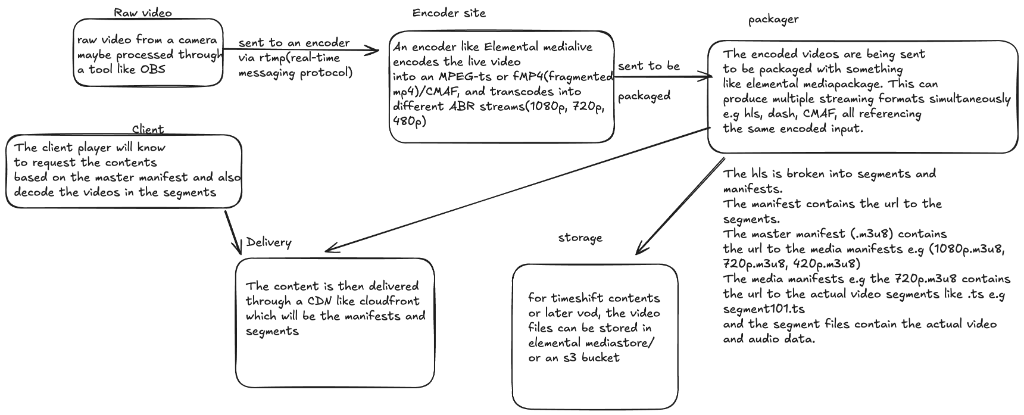
1. Raw Video Source
Everything starts with the raw video feed. This could be from a professional camera or a software tool like OBS (Open Broadcaster Software).
- Protocol: The raw video is sent to the cloud via RTMP (Real-Time Messaging Protocol).
- Destination: An encoder.
2. Ingestion & Encoding (Elemental MediaLive)
The RTMP stream lands at the encoder, such as AWS Elemental MediaLive. This is where the heavy lifting happens.
- Transcoding: The raw high-bitrate stream is compressed into efficient formats like MPEG-TS or fMP4 (Fragmented MP4) / CMAF.
- ABR (Adaptive Bitrate) Ladder: The encoder creates multiple versions of the stream simultaneously (e.g., 1080p, 720p, 480p). This ensures that viewers with poor internet connections can still watch (at lower quality) while those on fiber get full HD.
3. Packaging (Elemental MediaPackage)
The encoded streams are sent to a packager, like AWS Elemental MediaPackage.
- Just-in-Time Packaging: Instead of storing every possible format, the packager dynamically prepares the content based on who is asking.
- Formats: It produces streaming manifests for different devices:
- HLS (Apple devices, most web players)
- DASH (Android, Chrome, Firefox)
- CMAF (Low latency standard)
4. Storage & Timeshift (MediaStore / S3)
For features like "rewind live TV" or generating a VOD (Video on Demand) file after the event, the segments needs to be persisted.
- Destination: AWS Elemental MediaStore or Amazon S3.
- Use Case: This allows for "Timeshift" viewing, where a user can pause the live stream and resume it minutes later.
5. Delivery (Amazon CloudFront)
We can't have millions of viewers connecting directly to the origin packager. That would crash the service.
- CDN: Amazon CloudFront acts as the global distribution layer.
- Caching: It caches the manifests (
.m3u8/.mpd) and video segments (.ts/.m4s) at Edge Locations close to the viewer. This massively reduces latency and offloads traffic from the origin.
6. The Client (Player)
Finally, the video reaches the user's device.
- Master Manifest: The player requests the master manifest to see what qualities are available (1080p, 720p, etc.).
- Media Manifest: Based on available bandwidth, it selects a specific quality track.
- Segments: It downloads the actual small chunks of video (segments) specified in the manifest and plays them in sequence.
This entire journey—from camera lens to pixels on your screen—happens continuously, thousands of times per second, to deliver a seamless live experience.